





Not a radio menu — a radio system
GTA's radio wheel is a decade old, it's identical on every server, and it plays every station everywhere at full strength whether you're in Vinewood or on top of Mount Chiliad. Your players tune it once and forget it exists.
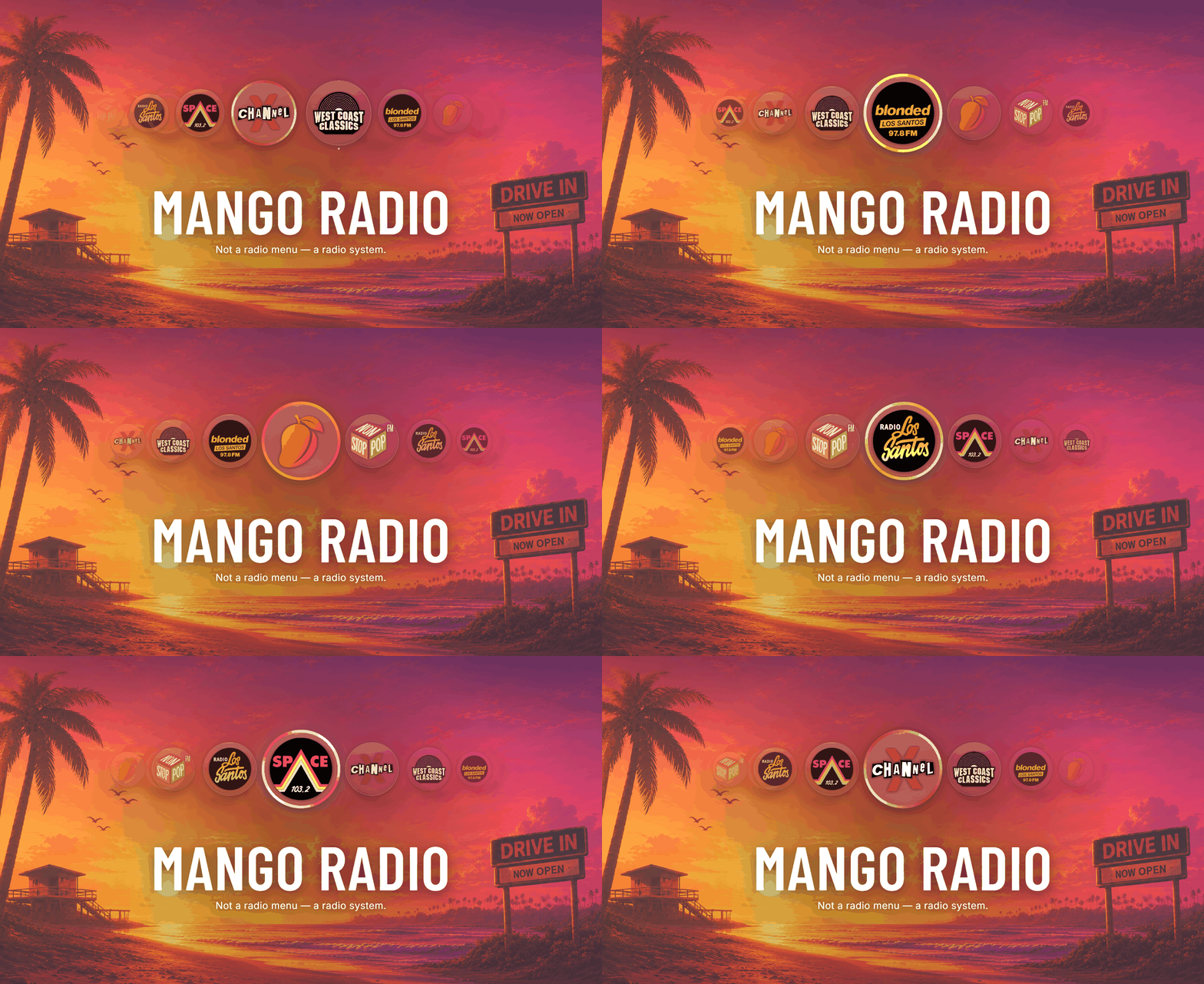
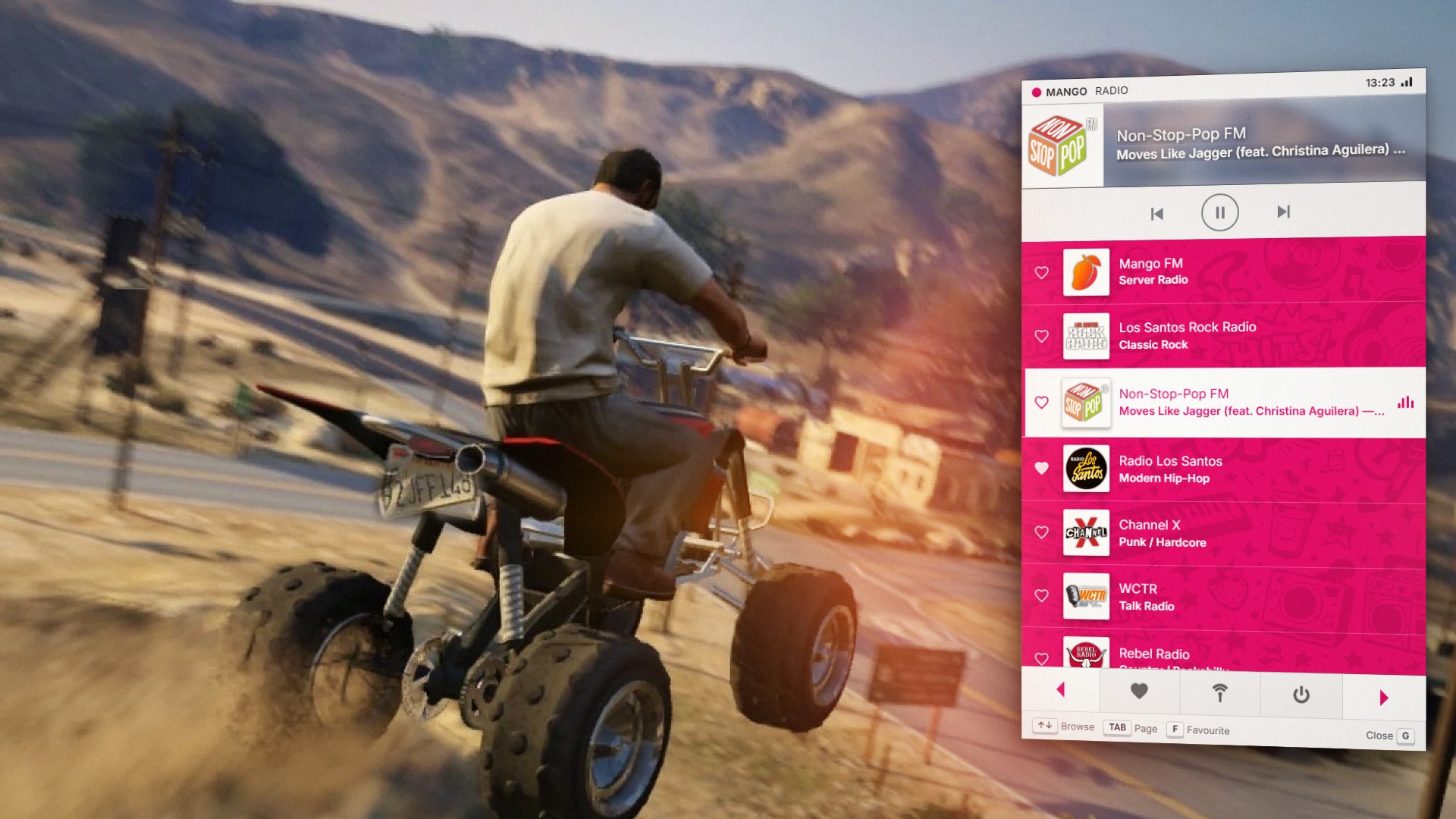
Mango Radio replaces it with two surfaces that stay in sync — a hold-to-browse carousel of real station artwork, and a full station browser you can drive entirely from the keyboard while you're still steering — then adds the two things the game never had.
A station you actually control
Drop audio files into html/music/, list them in music.lua, and your server has its own station sitting in the carousel next to Los Santos Rock Radio. Playback is scheduled by the server, not the client, so everyone tuned in hears the same song at the same second — and someone joining mid-song drops straight into the middle of it, exactly like a real station. Self Radio plays files from each player's own PC; this is one broadcast everybody shares.
Stations with real transmitters
Give a station a transmitter and it only reaches so far. Drive out of range and it either degrades into radio static or drops off the list entirely, so you can never tune to something you wouldn't hear. Drive back and it retunes on its own. Stations without coverage stay receivable everywhere, exactly like vanilla — it's opt-in, per station.
Every track named
GTA only reports what's playing as an internal id. Mango Radio ships a lookup table of 1,056 tracks — the base game and every radio DLC — generated from the game's own audio metadata, so the artist and title shown are the same strings the game itself would use.
Genuinely standalone
No framework. No database. No dependencies. No external requests — the fonts and every station logo ship inside the resource, so nothing breaks when a CDN has a bad day. Favourites are stored server-side against the player's license, so they survive restarts with nothing to install.
And 0.00ms idle, because nothing runs every frame while you drive. The stock radio wheel is taken away once with a native, not by disabling controls on every single frame — which is why most radio replacements never idle at zero.
Built to be edited
Every station is a line in one commented config file: reorder them, remove them, or add entries for custom radio resources so they sit alongside the stock ones. Both keybinds are rebindable by each player in FiveM's own key bindings. Carousel size, position, spacing, falloff, ring colours, menu accent, genre artwork and the frontend sounds are all config values.
Requirements
None. It runs the same on ESX, QBCore, Qbox or a bare server.
[mango_product_info]
[features]
[feature icon="radio" title="Tap to Skip, Hold to Browse"]
Tap the key to change station. Hold it and a carousel of real station artwork opens — skim with the mouse, release to select. You keep steering, throttle and brake the whole time.
[/feature]
[feature icon="layers" title="Full Station Browser"]
A second key opens the complete list with logos, genres and the current track. Drive it entirely from the keyboard — no cursor, so nothing steals your mouse while you're driving.
[/feature]
[feature icon="broadcast" title="Your Own Server Station"]
Host your own music as a real station. The server schedules playback, so every listener hears the same song at the same moment and late joiners drop straight into the middle of it.
[/feature]
[feature icon="signal" title="Broadcast Range & Static"]
Per-station transmitter coverage. Drive out of range and a station degrades into radio static or drops off the list entirely, then retunes on its own when you come back.
[/feature]
[feature icon="music" title="1,056 Tracks Named"]
Artist and title for every song in the base game and every radio DLC, taken from the game's own audio metadata — shown live under the station name with an animated equalizer.
[/feature]
[feature icon="heart" title="Favourites Without a Database"]
Heart any station and it lands in the Favourites tab. Stored server-side against the player's license, so they survive reconnects and restarts with no SQL to set up.
[/feature]
[feature icon="zap" title="0.00ms Idle"]
Nothing runs every frame while you drive. The only per-frame loop exists while the carousel is actually held open, and dies the moment you release it.
[/feature]
[feature icon="box" title="Genuinely Standalone"]
No framework, no database, no dependencies, no CDN. Runs the same on ESX, QBCore, Qbox or a bare server.
[/feature]
[feature icon="palette" title="Configurable Down to the Pixel"]
Carousel size, position, spacing, scale and fade falloff, ring thickness and spin, menu accent colour, genre artwork, sounds and both rebindable keybinds — all in one commented config.
[/feature]
[feature icon="check" title="Knows Your Game Build"]
Radio stations vary between builds. Mango Radio asks the game which ones actually exist and hides the rest, so the carousel can never get stuck on a station your version doesn't have.
[/feature]
[/features]
[promotion]
enabled="true"
label="Free Resource"
title="Try Mango Notify — Free"
description="The notification layer the rest of the Mango 5M catalogue is built against."
image="PROMO_IMAGE_URL"
button_text="Get It Free"
button_url="/package/7584479"
details_text=""
details_url="/package/7584479"
[/promotion]
[dependencies]
[dependency name="None — Fully standalone"]
[/dependencies]
[updates]
[update version="1.1.0" date="22 September 2026" title="Track Skip & Engine Sync" url="https://mango-5m.gitbook.io/mango5m-docs/resources/mango-radio/updates#v1.1.0"]
V1.1.0 adds track skipping to the server station — and Mango FM now stops with the engine, exactly like every built-in station.
[/update]
[/updates]
[/mango_product_info]
Our support team is available 24/7 on Discord to assist you with any questions.
Join Discord 24/7 Community Support

Gift Mango Radio and have it sent directly to their CFX.re account, so you don't have to transfer it after purchase.
